
Gu3stWiFi?
The Wi-Fi details were on the card. Connecting still took three attempts.
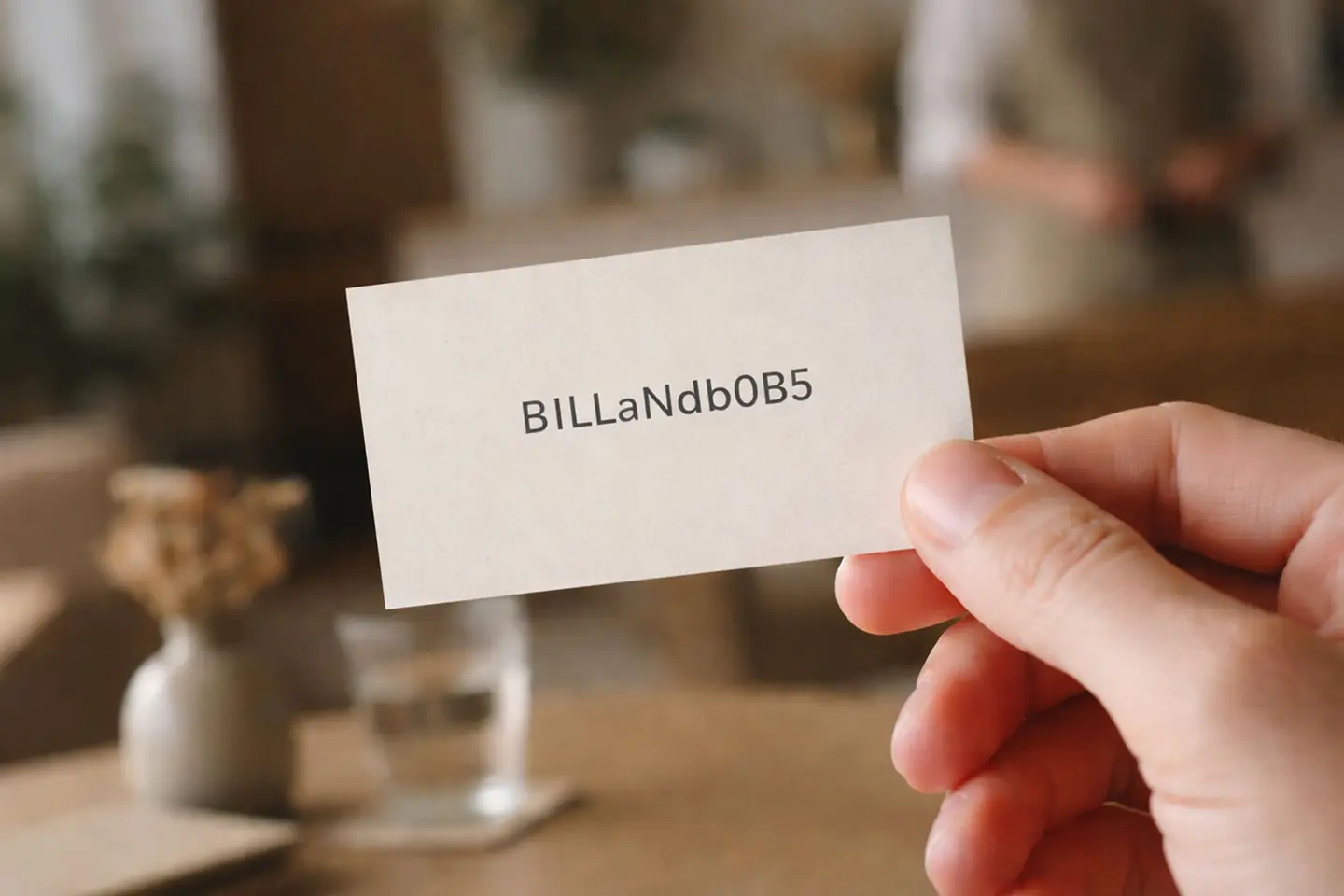
The hotel had Wi-Fi.
Good Wi-Fi, as it turned out.
There was just a small administrative hurdle before I was allowed to experience it.
The password.
It was printed on the welcome information: a long jumble of upper-case letters, lower-case letters and numbers, including several characters that appeared to have been specifically selected because they looked almost identical.
I typed it into my laptop.
Wrong password.
I typed it again, more carefully.
Wrong password.
This was irritating because I was now fairly certain I had entered exactly the same thing twice, while apparently expecting a different result.
So began the forensic stage.
Was that an upper-case I or a lower-case l? Was the round thing a zero or an O? Was the character I’d assumed was a 5 actually an S?
By the third attempt, connecting to the internet had become less of an amenity and more of a challenge issued personally by the hotel.
Eventually, I got in.
The Wi-Fi was excellent.
Nobody meant to create an intelligence test
There was presumably a perfectly sensible reason for the password.
Guest Wi-Fi needs some security. You probably don’t want to leave the network open to everyone within range.
But I doubt anyone at the hotel had sat down and said, “What we really need here is a password that makes a tired guest question their understanding of the Latin alphabet.”
More likely, the router generated something horrible and somebody faithfully copied it onto the guest information.
Job done.
Except that somewhere between we have secure Wi-Fi and guests can easily use the Wi-Fi, a small but important bit of thinking had gone missing.
This is how perfectly sensible systems become ridiculous
From inside the hotel, the password probably caused almost no trouble at all.
Staff devices were already connected. The office computer remembered it. Anyone who had entered it successfully yesterday wasn’t entering it again today.
The only people regularly experiencing the password were new guests.
Which is convenient, because they’re also the people least likely to complain about something this trivial.
You don’t march down to reception demanding to see the manager because you’ve confused an O with a zero.
You squint, try again and mutter something.
Then, if necessary, you go downstairs and ask.
This is how minor friction survives. It’s annoying enough to affect the customer but not annoying enough to generate much useful feedback for the business.
The technology was working perfectly
That’s the slightly absurd bit.
There was nothing wrong with the Wi-Fi. The broadband was fast, the signal was strong and the network was stable.
If someone had asked whether the hotel had good Wi-Fi, the technically correct answer would have been yes.
The guest answer, for the first few minutes, was somewhat different.
And this distinction crops up all over hospitality. The thing can work perfectly while the experience of using it doesn’t.
The heating works, but nobody can work out the thermostat. The shower is excellent once you’ve discovered which of the identical controls actually makes it hot. The television has every channel imaginable, but switching it on involves two remote controls and a lucky guess.
And a hotel has excellent Wi-Fi which is currently inaccessible because the guest is still trying to work out whether that character is a letter or a number.
The system hasn’t failed technically.
It has failed at the handover.
Security doesn’t have to look like a ransom note
The good news is that this is an unusually easy problem to solve.
A secure password doesn’t need to be an unmemorable collection of characters. A few unrelated words can be both much easier to type and perfectly suitable for a guest network when the wider network is configured appropriately.
Even better, put a QR code beside it.
Phone comes out. Camera opens. Tap. Connected.
Keep the written password underneath for laptops and anything else that needs it.
And when choosing how to display it, remember that guests may be reading it in poor light, without their glasses, from a small card while entering it on another device.
If your password contains characters that require a committee meeting to identify, choose another one.
Try it before the guests do
There’s a wonderfully simple test for systems like this.
Take a device that has never connected before and use only the information you’ve given the guest.
Not the staff version. Not what you know from memory. Not the password saved in your phone.
Start from zero.
If you can connect easily, excellent.
If you find yourself holding the card under a lamp and wondering whether the third character is an I, an l or the number 1, you’ve learnt something useful.
Because the purpose of guest Wi-Fi isn’t to have a secure password printed beautifully on a card.
It’s to get the guest online.
Preferably before they crack the code.